
The goal of this page is simple: by the end of it, you will understand which entities an aircraft mod consists of, and how DA_Aircraft serves as its central assembly point.
1. What a mod is
A mod is a set of files and assets that you create inside the ModKit project. For an aircraft, this set is organized into its own dedicated mod folder.
You do not rebuild the game, and you do not modify existing aircraft: you add your own aircraft to the game. One mod – one aircraft – one folder. The kit ships with a working example mod built exactly this way, which you can use as a reference.
2. DA_Aircraft – the assembly point of an aircraft
In FPS2, an aircraft is assembled from data, presentation, and configuration. The central point of this assembly is DA_Aircraft – the aircraft interface contract. It stores neither geometry nor logic; instead, it binds together everything that describes your aircraft.
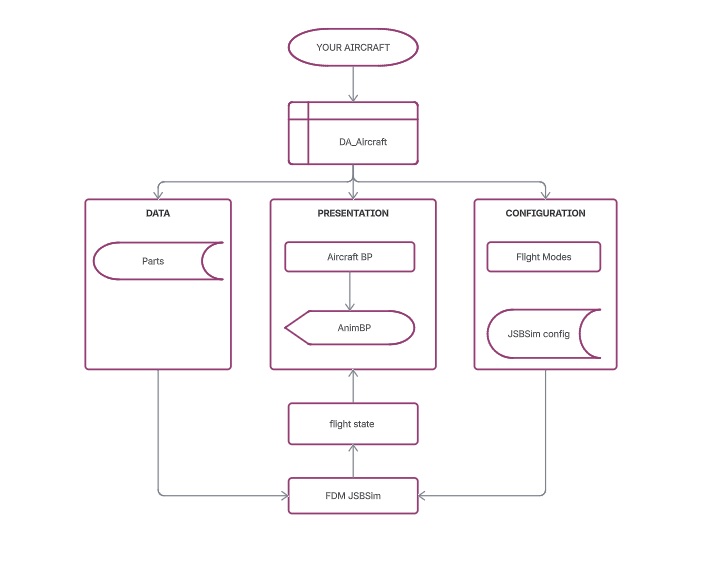
Three branches that the interface contract holds together:
| Branch | What it is | Responsibility |
|---|---|---|
| Data – Parts | Part Data Assets | Which components the aircraft has and how they behave |
| Presentation – Aircraft BP → AnimBP | Aircraft Blueprint and animation | How the aircraft looks and how its bones move |
| Configuration – Flight Modes → JSBSim config | Flight modes and JSBSim files | How the aircraft actually flies |
Do not confuse them.
DA_Aircraftis not a Blueprint, not a mesh, and not an AnimBP. It is a separate asset that references them. Without a correctly configuredDA_Aircraft, the game cannot assemble your aircraft, even if the 3D model and Blueprints are completely ready.
3. Parts are the foundation
Why an aircraft is a set of Data Assets
Everything configurable on an aircraft is treated as data. The runtime logic (how flight physics are calculated, how bones move, how cargo attaches) is already built into the ModKit – you do not touch it. You only define the values.
This design provides three major benefits:
- An aircraft is built and tuned without programming;
- Any part can be swapped or modified without breaking the aircraft;
- A mod is distributed as content files, without rebuilding the game.
How parts connect to the interface contract
DA_Aircraft holds references to its parts. Each part contains an AircraftIds field confirming which aircraft it belongs to. That value must match the AircraftId defined in the contract.
An empty part slot is not an error: if a slot is left empty, that specific subsystem is simply not registered or configured.
| Part | What it configures |
|---|---|
| Engines | Thrust vector limits and deflection directions |
| Cargo ramp / hold | Internal cargo capacity and bay properties |
| Cargo crane | Bone attachments for picking up and releasing cargo |
| Landing gear | Marker part: movement is driven by AnimBP |
| Ailerons, rudder, elevator, flaps | Marker parts: movement is driven by AnimBP |
Currently, the parts that hold dedicated configuration data are engines, cargo ramp, and cargo crane. Control surfaces and landing gear act as marker parts (they register the component’s presence in the system), while their physical animation is driven inside the AnimBP (see the animation and control-surface guides).
4. Other required aircraft files
| Asset | Purpose | Required | Where it is configured |
|---|---|---|---|
| Skeletal Mesh | 3D model with a bone hierarchy | Yes | Imported mesh; assigned in the Aircraft BP |
| AnimBP | Drives bone transformations from flight data | Yes (for animation) | AnimBP graph; assigned in the Aircraft BP |
| Aircraft BP | The in-game actor: mesh, cameras, collisions, sensors | Yes | Blueprint Editor |
| JSBSim configuration | Flight dynamics model (aerodynamics, mass and balance, control limits) | Yes (otherwise it will not fly) | Configuration XML files; referenced by name in DA_Aircraft |
5. What you do not have to write
The ModKit provides the entire runtime framework. You do not need to write C++ code, integrate flight dynamics math, or handle low-level input pipelines. You simply assemble an aircraft from existing systems by providing assets, parameters, and configuration files.