
A mod is a Game Feature plugin. One mod – one aircraft – one folder.
1. The GameFeatures plugin
It is already enabled in the kit. Go to Edit → Plugins and search for GameFeatures. The checkbox should already be enabled, so there is nothing to turn on. It provides the Game Feature templates used by the plugin creation wizard.
2. Create the mod plugin
Edit → Plugins → Add → New Plugin.- Template –
Game Feature (Content Only) - Folder –
Plugins/GameFeatures/ - Name – Latin characters, no spaces (e.g., MyPlane).
- Create Plugin.
Do not use Blank: it creates a regular plugin with a C++ module and no GameFeatureData, so FPS2 does not treat it as an aircraft mod.
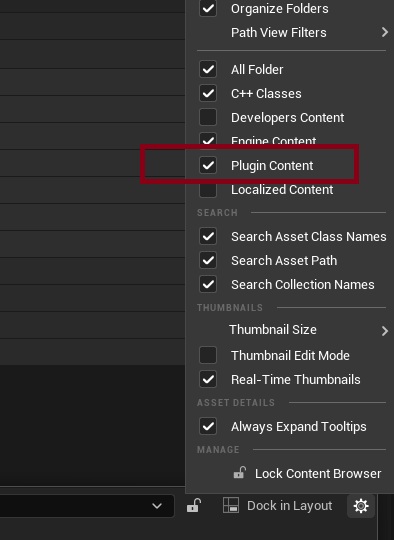
⚠️ By default, Unreal hides plugin content, so it may look as if the plugin was not created.
Turn it on: in the Content Browser Settings (the cog, top right) →Show Plugin Content.
After that /Plugins/<ModName> Content/ appears.
- Plugins/GameFeatures/
<ModName>/<ModName>.uplugin- Content/ ← mod content
- Resources/
3. The GameFeatureData asset — the Details tab
In the Content Browser, open /Plugins/<ModName> Content/<ModName>
| Section | Field | Value | What to do |
|---|---|---|---|
| Feature State | Current State | Active | Click Loaded to edit the asset; switch it back to Active when finished. |
| Asset Manager → Primary Asset Types to Scan | Primary Asset Type | Aircraft | Enter exact name |
| Asset Base Class | DA_Aircraft | Select class from dropdown | |
| Directories | / | Enter or Select mod content path | |
| Rules → Cook Rule | AlwaysCook | Set to AlwaysCook | |
| Rules → Apply Recursively | Checked | Enable |
⚠️ Cook Rule AlwaysCook + Apply Recursively are mandatory.
Otherwise, the engine will not cook your mod assets into the final package, and your aircraft will be completely missing in the packaged game.
4. Checklist
- Template
Game Feature (Content Only), folderPlugins/GameFeatures/<ModName>/. - Plugin Content is ticked in the Content Browser — the mod folder is visible.
- The folder has no
Source/, noBinaries/. Primary Asset Types to Scan:Aircraft/DA_Aircraft/Directories = /<ModName>.RuleshasCook Rule = AlwaysCookandApply Recursively.- Mod content is assembled in
Content/.